Vibe Coding สอนสร้างระบบทำใบเสนอราคาพร้อมส่งอีเมลใช้เองแบบไม่ต้องเขียนโค้ด ด้วย VibeKit

สร้าง ระบบสร้างใบเสนอราคาออนไลน์ด้วยตัวเอง ช่วยให้ธุรกิจออกเอกสารได้รวดเร็วผ่านเทมเพลต ลดข้อผิดพลาดจากการคำนวณเงินผิดหรือพิมพ์ข้อมูลซ้ำซ้อน และสามารถส่งให้ลูกค้าผ่านอีเมลได้ทันที อีกทั้งยังสามารถดูข้อมูลย้อนหลัง ทำงานต่อได้ทันที
โปรเจกต์นี้เป็นการใช้ VibeKit template คือ Template สำหรับ Vibe Coding ที่มาพร้อมกับระบบ Login with Google, การเชื่อมต่อ Database, การอัปโหลดไฟล์ และระบบจัดการสิทธิการใช้งาน (Role-based access) ทำให้คุณสามารถเริ่มพัฒนา Internal tools หรือ SaaS ได้เอง โดยไม่ต้องเริ่ม Prompt จากศูนย์ (เพราะเราเตรียมโครงสร้างพื้นฐานไว้ให้แล้ว) ซึ่งมีต้นทุนต่ำกว่าการใช้แพลตฟอร์ม No-Code ในท้องตลาด สนใจ VibeKit คลิก
ตัวอย่าง Application ที่ใช้งานจริง
เกี่ยวกับ Project
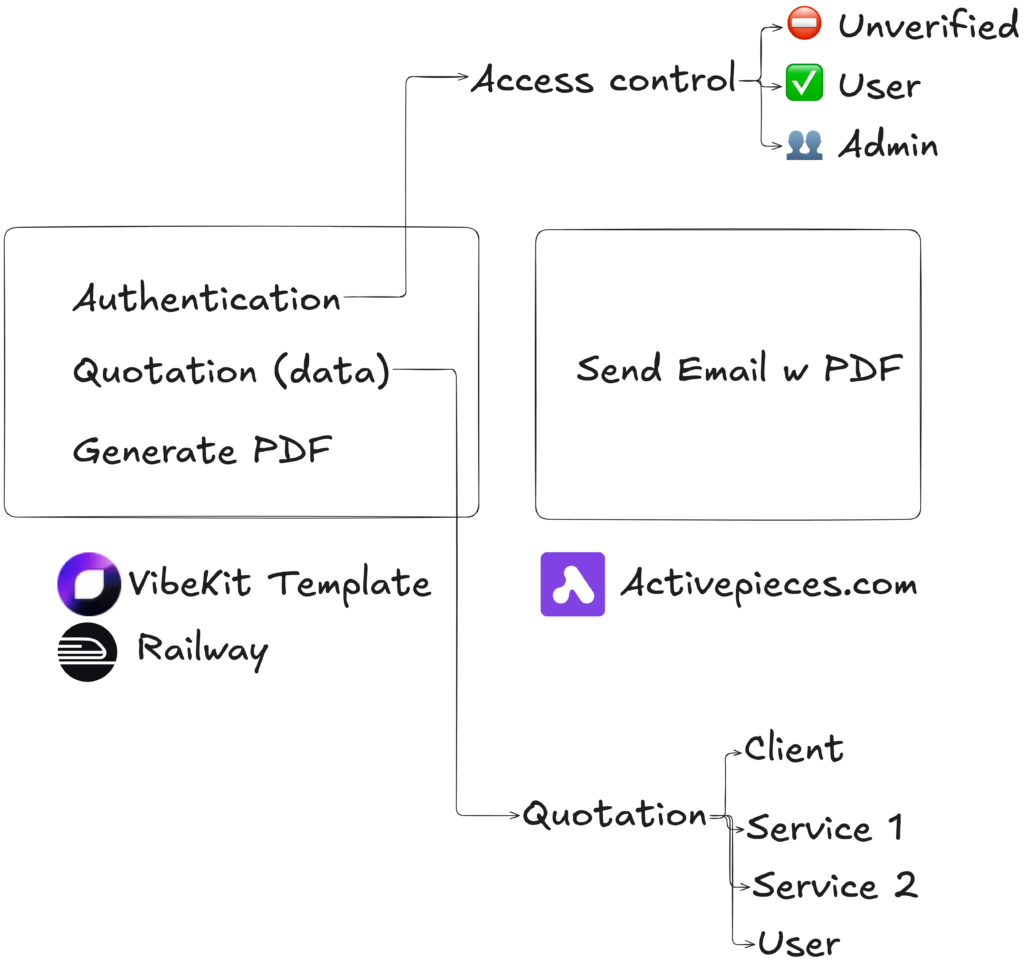
ฟีเจอร์การทำงาน (Features):
- ผู้ใช้สามารถดูสถิติการขายอย่างง่ายผ่านทางหน้า Dashboard ได้
- ผู้ใช้สามารถจัดการข้อมูล (สร้าง/แก้ไข) ข้อมูลใบเสนอราคา, สินค้า/บริการ และลูกค้าได้
- ผู้ใช้สามารถกรอกอีเมลเพื่อส่งใบเสนอราคา (พร้อมแนบไฟล์ PDF) ไปหาผู้ที่เกี่ยวข้องได้โดยตรงจากระบบ
Data Model Diagram (โครงสร้างข้อมูล) (ใช้ใน PRD)
Quotation Application
- 1 Record มีข้อมูลดังนี้
- วันที่สร้าง Record
- สถานะ Record 1 สถานะ (ได้แก่ รออนุมัติ, อนุมัติ, รอเก็บเงิน, เก็บเงินแล้ว, ยกเลิก)
- เงื่อนไข การจ่ายเงิน (ข้อความ)
- การหักภาษี (ได้แก่ 3%, 1.5%)
- 1 Record มีลูกค้า 1 คน มีข้อมูลดังนี้
- เลขทะเบียนนิติบุคคล / เลขผู้เสียภาษี (ข้อความ)
- ประเภท (ได้แก่ นิติบุคคล, คนทั่วไป)
- ชื่อธุรกิจ (ข้อความ)
- ที่อยู่ (ข้อความ)
- รหัสไปรษณีย์ (ข้อความ)
- 1 Record มีสินค้า / บริการได้หลายอัน โดยสินค้า บริการแต่ละชิ้นมีข้อมูลดังนี้
- ชื่อสินค้า / บริการ (ข้อความ)
- รายละเอียด (ข้อความ)
- ราคา (ตัวเลขแบบมีทศนิยม)
อ้างอิงจาก แนวทางการออกแบบ Database สำหรับการทำ No-Code / Low-Code / Vibe Coding ฉบับเข้าใจง่าย
ระบบจัดการสิทธิการใช้งาน (Roles):
- Unverified: รอแอดมินอนุมัติเพื่อเข้าระบบ
- User: สามารถสร้างและแก้ไขข้อมูล Record, สินค้า, และลูกค้าได้
- Admin: จัดการผู้ใช้งานทั้งหมดได้ และมีสิทธิการใช้งานเหมือน User ทุกประการ
เทคโนโลยี / เครื่องมือที่ใช้ใน Project
- VibeKit Template: สำหรับการสร้าง Web Application โดยทำงานผ่าน GitHub Codespaces
อ่านรายละเอียดเพิ่มติมเกี่ยวกับ VibeKit - Activepieces (Automation tools) สำหรับการทำระบบอัติโนมัติในขั้นตอนการส่งอีเมลพร้อมแนบไฟล์ PDF เพื่อให้ไม่ต้องตั้งค่า SMTP เอง
- Railway (Hosting) สำหรับการ Publish project เพื่อเข้าใช้งานจริง
ค่าใช้จ่ายที่อาจจะเกิดขึ้นใน Project
สำหรับการทำระบบนี้เพื่อใช้งานจริง สามารถแบ่งค่าใช้จ่ายรายเดือนได้ดังนี้:
- Coding Agent (GitHub Copilot) สำหรับใช้ AI ช่วยพัฒนา (Development) ประมาณ $10/เดือน (เริ่มใช้งานได้ฟรี)
- GitHub Codespaces สำหรับใช้รัน Project บน Cloud โดยไม่ต้องติดตั้งโปรแกรม (ใช้งานได้ฟรี 60 ชั่วโมง / เดือน)
- Activepieces ใช้งานได้ฟรีใน 10 Project แรกแบบไม่มีข้อจำกัด
- Hosting (Railway): สำหรับรันระบบจริงให้คนในทีมเข้ามาใช้งาน (Publish) ประมาณ $5/เดือน
- Domain name: ค่าจดโดเมนเนมเพื่อให้ได้ชื่อเว็บไซต์ตามต้องการ (รายปี) ประมาณ 400 – 1,000 บาท
สิ่งที่ต้องเตรียม
- VibeKit template
- Google account
- GitHub account
- Activepieces account
ขั้นตอนการลงมือทำ
แบ่งขั้นตอนการลงมือทำได้ดังนี้
- Development Stage (ขั้นตอนการพัฒนา): Setup VibeKit, ออกแบบ PRD, และใช้ Vibe Coding สร้าง Database และ UI
- Automation Stage (ขั้นตอนการทำระบบอัตโนมัติ): ตั้งค่า Activepieces เพื่อส่งอีเมล PDF
- Testing Stage (การตรวจสอบ): ทดสอบระบบ (Manual Testing) ตาม Test Case
- Deployment Stage (ขั้นตอนการใช้งานจริง): สำรองโค้ดผ่าน GitHub และ Deploy ขึ้น Railway
ติดตั้ง VibeKit Template
ขั้นตอนการ Setup ระบบให้พร้อมสำหรับ Vibe Coding โดยการเตรียมไฟล์ VibeKit Template และเปิดใช้งาน GitHub Codespaces
- สั่งซื้อ VibeKit และอัปโหลด VibeKit File ไว้บน GitHub ผ่าน GitHub Desktop
- Setup Codespaces เครื่องมือพัฒนาที่ใช้งานผ่าน Browser โดยไม่ต้องติดตั้งโปรแกรม และส่วนเสริมที่เกี่ยวข้อง
สร้าง Product Requirement Document (PRD) และ Prototype
PRD สำหรับโปรเจกต์นี้จะเน้นไปที่เรื่อง Database Schema เป็นหลัก โดยเราจะใช้ Prompt สั่งให้ AI ช่วยเขียน PRD และ Prototype ให้ก่อนนำไปใส่ไว้ในไฟล์ addons.md ใน GitHub Codespaces (สามารถเพิ่มรายละเอียดอื่น ๆ ได้เช่น UX/UI , Concept etc.)
อ่านเพิ่มเติมเกี่ยวกับการเขียน PRD ฉบับเต็ม
Prompt สำหรับสร้าง PRD

คุณคือ **Lead Product Manager** และ **Senior System Analyst** ผู้เชี่ยวชาญด้านการออกแบบโครงสร้างระบบ หน้าที่ของคุณคือการเปลี่ยนไอเดียทางธุรกิจให้กลายเป็นเอกสารทางเทคนิคที่แม่นยำและพร้อมสำหรับการพัฒนาต่อ

### ภารกิจ (Mission)

สร้างเอกสารในรูปแบบ **Markdown** (.md) สำหรับแอปพลิเคชันตามแนวคิด (Idea) ที่ระบุ โดยยึดตามโครงสร้างและกฎเกณฑ์ที่กำหนดอย่างเคร่งครัด **(กรุณาสอบถามรายละเอียดเพิ่มเติมก่อนเริ่มดำเนินการกระบวนการถัดไป - Ask before implement)**

### โครงสร้างเนื้อหาที่ต้องระบุ (Required Structure)

**1. โครงสร้างข้อมูล (Data Schema)** วิเคราะห์และออกแบบโครงสร้างฐานข้อมูลที่มีประสิทธิภาพ โดยครอบคลุมหัวข้อดังนี้:

- **ความสัมพันธ์ของข้อมูล (Entity Relationship):** อธิบายความเชื่อมโยงระหว่างชุดข้อมูล (เช่น One-to-Many หรือ Many-to-Many)

- **การจัดระเบียบข้อมูล (Normalization):** ออกแบบตามหลักการ Normalization ไม่เกินระดับ **3NF** เพื่อลดความซ้ำซ้อนและรักษาความถูกต้องของข้อมูล (Data Integrity)

- **รายละเอียดฟิลด์ (Field Specifications):** นำเสนอในรูปแบบ **ตาราง (Table)** ซึ่งประกอบด้วย:

    - ชื่อฟิลด์ (Field Name)

    - ประเภทข้อมูล (Data Type)

    - ข้อกำหนดเพิ่มเติม (Constraints เช่น PK, FK, Unique, Not Null)

    - ตัวอย่างข้อมูล (Sample Data)

** ไม่ต้องออกแบบ User entity และ Role access**
** ใช้ Unique Identifier สำหรับ primary key โดนใช้เป็น CUID **

### Format
เขียนในรูปแบบไฟล์ Markdown

รายละเอียด Application
[รายละเอียด Application]
นำข้อมูลส่วนของ Data Model Diagram (โครงสร้างข้อมูล) (ใช้ใน PRD) มาก็อปปี้ใส่ตรงรายละเอียด Application
สิ่งที่ได้รับ AI จะพยายามช่วยออกแบบโครงสร้างข้อมูลที่เหมาะสมกับโจทย์ของงาน โดยการมีสอบถามเกี่ยวกับ Usecase การใช้งาน สามารถอ่านขั้นตอนการออกแบบโครงสร้างข้อมูลด้วยตัวเองที่ แนวทางการออกแบบ Database สำหรับการทำ No-Code / Low-Code / Vibe Coding ฉบับเข้าใจง่าย
Prompt สำหรับสร้าง Prototype ใช้ใน Artifact / Gem ของ LLM Chat

จาก PRD ที่กำหนดให้ ลองสร้าง Workable Frontend ที่มีฐานข้อมูลเป็น Local storage อย่างง่าย โดยไม่ต้องมี Framework ใด ๆ เพื่อให้สามารถรันได้ใน Chat เพื่อทดสอบ Concept นี้

ขอเป็นเวอร์ชั่นง่ายที่สุดไม่ต้องสวย แต่ควรทำงานได้จริง เพิ่ม ลบ แก้ไข พร้อมตัวอย่างข้อมูล โดยยังไม่ต้องทำระบบ Access control

Avoid this error
* Blocked form submission to '' because the form's frame is sandboxed and the 'allow-forms' permission is not set.

PRD
[รายละเอียด PRD]
สิ่งที่ได้รับ AI จะพยายามออกแบบ Prototype อย่างง่าย โดยแบบฟอร์มจะมีข้อมูลให้กรอกครบถ้วน ให้ตรวจสอบดูว่ามีข้อมูลที่ต้องการครบมั้ย โดยยังไม่ต้องสนใจเรื่องความสวยงาม
ตัวอย่าง PRD ฉบับเต็มของ Project นี้ (ใส่ใน addons.md)

# Product Requirements Document (PRD)

## Quotation Management System

---

## 1. Data Schema

### 1.1 Entity Relationship Overview

The system is structured around **4 core entities**:

|Entity|Description|
|---|---|
|`quotation`|Main record representing a single quotation|
|`customer`|Customer information linked to a quotation|
|`quotation_item`|Line items (products/services) within a quotation|
|`product`|Master catalog of products/services|

**Relationships:**

- `quotation` → `customer` : **Many-to-One** (many quotations can reference the same customer)
- `quotation` → `quotation_item` : **One-to-Many** (one quotation has many line items)
- `quotation_item` → `product` : **Many-to-One** (many line items reference the same product)

---

### 1.2 Entity: `customer`

> Stores customer profile information. Reusable across multiple quotations.

|Field|Data Type|Constraints|Description|
|---|---|---|---|
|`customer_id`|UUID|PK, NOT NULL|Unique identifier|
|`tax_id`|VARCHAR(20)|NOT NULL|Corporate registration / Tax ID number|
|`customer_type`|ENUM|NOT NULL|`"juristic_person"` \| `"individual"`|
|`business_name`|VARCHAR(255)|NOT NULL|Business or full name|
|`address`|TEXT|NOT NULL|Full address|
|`postal_code`|VARCHAR(10)|NOT NULL|Postal / ZIP code|
|`created_at`|TIMESTAMP|NOT NULL|Record creation timestamp|
|`updated_at`|TIMESTAMP|NOT NULL|Last update timestamp|

---

### 1.3 Entity: `product`

> Master catalog of products and services. Reusable across multiple quotation line items.

|Field|Data Type|Constraints|Description|
|---|---|---|---|
|`product_id`|UUID|PK, NOT NULL|Unique identifier|
|`name`|VARCHAR(255)|NOT NULL|Product / service name|
|`description`|TEXT|NULLABLE|Detailed description|
|`base_price`|DECIMAL(15,2)|NOT NULL|Default unit price|
|`created_at`|TIMESTAMP|NOT NULL|Record creation timestamp|
|`updated_at`|TIMESTAMP|NOT NULL|Last update timestamp|

---

### 1.4 Entity: `quotation`

> Main record for each quotation issued. Links to one customer and contains metadata for payment and tax.

|Field|Data Type|Constraints|Description|
|---|---|---|---|
|`quotation_id`|UUID|PK, NOT NULL|Unique identifier|
|`quotation_number`|VARCHAR(50)|UNIQUE, NOT NULL|Human-readable reference (e.g., `QT-2025-0001`)|
|`customer_id`|UUID|FK → `customer`, NOT NULL|Linked customer|
|`status`|ENUM|NOT NULL|See status values below|
|`payment_condition`|TEXT|NULLABLE|Free-text payment terms / conditions|
|`withholding_tax_rate`|ENUM|NOT NULL|`"3%"` \| `"1.5%"`|
|`created_at`|TIMESTAMP|NOT NULL|Record creation timestamp|
|`updated_at`|TIMESTAMP|NOT NULL|Last update timestamp|

**Status Values:**

|Value|Label|
|---|---|
|`pending_approval`|รออนุมัติ / Pending Approval|
|`approved`|อนุมัติ / Approved|
|`pending_payment`|รอเก็บเงิน / Pending Payment|
|`paid`|เก็บเงินแล้ว / Paid|
|`cancelled`|ยกเลิก / Cancelled|

---

### 1.5 Entity: `quotation_item`

> Individual line items (products/services) associated with a quotation. Supports multiple items per quotation.

|Field|Data Type|Constraints|Description|
|---|---|---|---|
|`item_id`|UUID|PK, NOT NULL|Unique identifier|
|`quotation_id`|UUID|FK → `quotation`, NOT NULL|Parent quotation|
|`product_id`|UUID|FK → `product`, NULLABLE|Reference to product catalog (null if ad-hoc)|
|`item_name`|VARCHAR(255)|NOT NULL|Product / service name (copied or custom)|
|`item_description`|TEXT|NULLABLE|Item description|
|`unit_price`|DECIMAL(15,2)|NOT NULL|Price per unit at time of quotation|
|`quantity`|DECIMAL(10,2)|NOT NULL, DEFAULT 1|Quantity|
|`sort_order`|INTEGER|NOT NULL, DEFAULT 0|Display order within the quotation|
|`created_at`|TIMESTAMP|NOT NULL|Record creation timestamp|

---


---

### 1.7 Normalization Summary

|Normal Form|Compliance|Notes|
|---|---|---|
|**1NF**|✅|All fields are atomic; no repeating groups|
|**2NF**|✅|All non-key attributes are fully dependent on the primary key|
|**3NF**|✅|No transitive dependencies; customer and product data isolated in their own tables|

> **Design Notes:**
>
> - `item_name` and `item_description` in `quotation_item` are **intentionally copied** from `product` at the time of quotation creation. This ensures historical accuracy — if a product's name or price changes later, existing quotations remain unaffected.
> - `product_id` in `quotation_item` is **nullable** to support ad-hoc line items not present in the product catalog.

---
ทำ Version Control บันทึก และย้อนการแก้ไขใน Code ด้วย Git


เก็บประวัติการทำงานและสำรองโค้ดด้วยการ Commit และ Push ไปยัง Main บน GitHub การทำ Versioning ด้วย GitHub และการตรวจสอบ Sourcecode
Vibe Coding ด้วย VibeKit
การ Vibe Coding โดยการกำหนด Spec ผ่าน addons.md เน้นการทำทีละขั้น โดยไม่สั่งให้ Coding Agent ทำทีเดียวเพราะตรวจสอบความผิดพลาดยาก โดยเริ่มจากการ Setup Database แล้วค่อยไปสร้าง UI ทีละหน้า ๆ จนครบ
สร้าง Database ในระบบ
สร้าง Database Schema และตรวจสอบผ่าน Database viewer (แนะนำให้ลองใส่ Mock Data เข้าไปเพื่อตรวจสอบ)
Prompt สำหรับสร้าง Database
อ่านไฟล์ #file:addons.md ที่กำหนด
และเริ่มสร้าง Database ตาม Project Standard โดยมีการ mock data ตัวอย่างเข้าไปใน Database ด้วย Script

Plan and Ask before coding
ในระหว่างการสร้าง Database ตัว Coding agent อาจจะมีคำถาม (ตัวอย่างการตอบ) เช่น
**ขอคอนเฟิร์ม 4 จุดก่อนเริ่มลงมือ**

1. เรื่อง Primary Key: ให้ยึดตาม PRD เป็น `UUID` ทุก entity ใหม่เลยใช่ไหม (แม้ boilerplate เดิมนิยม CUID)? (Answer: ให้ใช้ CUID)

2. ค่า `withholding_tax_rate`: ใน Prisma enum จะใช้ชื่อปลอดภัย เช่น `WHT_3`/`WHT_1_5` แล้ว map เป็น `"3%"`/`"1.5%"` ใน DB โอเคไหม? (Answer: ให้ใช้ enum ชื่อที่ปลอดภัย)

3. `quotation_number`: ให้ seed mock เป็นรูปแบบ `QT-2025-0001`, `QT-2025-0002` ตาม PRD ใช่ไหม? (Answer: ให้รันเป็น CUID auto generate)

4. ให้ผมรัน migration/seed จริงใน environment นี้เลยหรือให้เตรียมโค้ดและ migration ไว้ก่อน (เผื่อคุณอยากรันเอง)? (Answer: ให้รันให้เลย)
เมื่อเขียนโค้ดเสร็จแล้ว ระบบจะทำการ Generate Schema ใหม่ โดยเราสามารถตรวจสอบข้อมูลใน Database ผ่าน Database viewer
สร้าง UI ในระบบ
สร้าง UI หน้าต่างๆ ผ่านการใช้รูปแบบ In ... page, user can ... and then ... ซึ่งจะทำให้ Coding Agent เข้าใจเงื่อนไขและทำงานได้อย่างถูกต้อง โดยเริ่มจากการสร้างหน้าอ่านข้อมูลก่อนแล้วค่อยเพิ่มฟีเจอร์การเพิ่ม หรือแก้ไขในภายหลัง
Prompt สร้างหน้าสำหรับดู List ของ Quotation ทั้งหมด และหน้าดู Quotation detail
In dashboard page,
User can see list of quotation with customer name, created date, total price with comma separator THB and status

User can click each quotation to see quotation detail

Plan and Ask before coding
Prompt สร้างหน้าสำหรับดู List ของ Product และ Customer
In dashboard page,
User can click card to see product list and click each product to see product detail
User can click card to see customer list and click each customer to see customer detail

Plan and Ask before coding
Prompt สร้างหน้าจัดการแก้ไข Quotation
User can add/edit quotation, add/edit product, add/edit customer

Plan and Ask before coding
สร้าง PDF จากใน Web App
ในขั้นตอนนี้ เราจะทำให้ Quotation ที่มีสถานะเป็น Approved มีปุ่มสำหรับ Download PDF ใช้ Font จาก Noto San Thai จาก Google Font โดยต้อง Download Font มาใส่ใน src/pdf-fonts ก่อนใช้งาน
Each quotation with status "Approved" can download PDF "quotation-<quotation_number>.pdf" using @react-pdf/renderer with Thai Font "Noto Sans Thai" in quotation detail page (download button)

Use bundled local Noto Sans Thai font files in project which I already uploaded in src/pdf-fonts

Plan and Ask before coding
อ่านเกี่ยวกับ เพิ่มความสามารถ WebApp ด้วย Package เสริมสำหรับ Vibe Coding
สร้าง Email Automation ด้วย Activepieces
ในขั้นตอนนี้เราจะใช้ Webhook ของ Activepices เพื่อรับข้อมูลจาก Web App โดยต้องใช้ Node Webhook และ Node Gmail ตามลำดับ
อ่านเพิ่มเติมเกี่ยวกับการสร้าง Webhook ใน Activepieces

สามารถเพิ่มความปลอดภัยโดยการใส่ Header เพิ่มเติมได้ในส่วนของ Authentication
โดย Header Name คือชื่อ และ Header Value คือรหัสที่เราใช้สื่อสาร รู้กันแค่ Application กับ Webhook
หลังจากสร้าง Node เสร็จเรียบร้อยแล้วให้นำ Webhook URL มา Prompt เพื่อสร้างช่องทางในการส่งข้อมูลจาก Web App ดังนี้
Prompt เรียกใช้ Webhook
For every quotation marked 'Approved,' provide a UI card to enter an receiver email and a 'Send PDF' button.

Clicking the button should call the following webhook to dispatch the PDF blob file and email: https://cloud.activepieces.com/....
Logging is not necessary.

Plan and Ask before coding
Prompt เรียกใช้ Webhook โดยมีการกำหนด Header
For every quotation marked 'Approved,' provide a UI card to enter an receiver email and a 'Send PDF' button.

Clicking the button should call the following webhook to dispatch the PDF blob file and email: https://cloud.activepieces.com/....
and sending header auth with "header_name": "header_value" treat it as secret key

Logging is not necessary.

Plan and Ask before coding
โดยเมื่อทดลองส่ง Email แล้วให้ Map value เพื่อส่งเข้ามาใน Email (ใส่ข้อมูล Receiver email และ PDF file)
Final Check
ตรวจสอบขั้นสุดท้าย (Pre-Deploy Checklist) ก่อนใช้งานจริง เพื่อให้มั่นใจว่า Application สามารถ Deploy ได้
Please run final check and fix issues to ensure that this app can build in production.

You are a pre-deployment verification agent. Your job is to run a complete
pre-deploy check on this Next.js + Prisma + TypeScript project and report
the results.

Run the following checks in order.

---

## Stage 1 — Code Quality

1. [CRITICAL] Run TypeScript type check (no emit):
   npx tsc --noEmit
   → Report: number of errors, list each error with file:line

2. [CRITICAL] Run ESLint:
   npm run lint
   → Report: number of errors/warnings, list each with file:line

3. Run Prettier format:
   npm run format

---

## Stage 2 — Build

4. [CRITICAL] Run production build:
   npm run build
   → Report: whether build succeeded or failed
   → If failed: copy the exact error message and file:line
   → If succeeded: note any warnings (e.g. large bundle sizes, missing metadata)

---

## Stage 3 — Database

5. Check Prisma migration status:
   npx prisma migrate status
   → Report: whether schema is in sync or has pending migrations
   → List any unapplied migrations by name

6. Regenerate Prisma client:
   npx prisma generate
   → Report: success or failure


---
เบื้องหลังการทำงานของ Prompt (คำอธิบาย)
ส่วนที่ Highlight คือคำสั่งที่สามารถลองพิมเพื่อรันใน Terminal เพื่อตรวจเช็คด้วยตัวเองได้
Stage 1 — Code Quality (เร็วสุด, ทำก่อน)
ตรวจสอบ Sourcecode เบื้องต้นที่อาจจะเขียนผิดพลาด คำสั่งไม่ถูกต้องผ่าน
- หา typescript error ทั้งหมดโดยไม่ต้อง build:
npx tsc --noEmit - หา lint errors ที่อาจทำให้ build fail:
npm run lint - Format โค้ดให้อ่านง่าย (optional แต่ดี):
npm run format
Stage 2 — Build Verification (สำคัญที่สุด)
ตรวจสอบว่าระบบสามารถ Build ใน Production ได้หรือไม่ผ่าน
npm run build
Stage 3 — Database & Schema
- ตรวจสอบว่า Prisma Schema sync กับ DB จริงผ่าน
npx prisma migrate status - สร้าง Prisma Client ให้ตรงกับ schema ปัจจุบันผ่าน
npx prisma generate
แนวทางการทดสอบระบบ (Manual Testing)
การทดสอบระบบก่อนใช้งานจริง (Acceptance Testing) เป็นสิ่งสำคัญเพื่อป้องกันข้อผิดพลาด เราสามารถใช้ Prompt ให้ AI สร้าง Test Case สำหรับทดสอบการทำงานทีละฟีเจอร์ได้
Prompt สำหรับสร้าง Test Case เพื่อตรวจสอบการทำงานเอง
For the existing project structure,
please create a markdown file containing test cases to help users test the app's functionality before launch.
Deployment ผ่าน Railway
FAQ & Common Error
- เมื่อเกิดปัญหาไม่สามารถ Login ได้ Error 400: redirect_uri_mismatch
- Login แล้วไม่ได้สิทธิเป็น Admin อาจจะเป็นเพราะไม่ใช่ User แรกที่ Login ให้เข้าไปแก้ไขสิทธิเอง
npm run setupไม่ได้ แสดง errortsx src/scripts/setup.ts
sh: 1: tsx: not found
แปลว่าระบบยังติดตั้งไม่เสร็จให้รอติดตั้งให้เสร็จก่อน ค่อยใช้งาน Terminal- GitHub Codespaces ใช้งานไม่ได้ /เตือนโควตาเต็ม: ปิด Codespace ที่ไม่ได้ใช้งานเป็นประจำ เพราะแผนฟรีให้ 60 ชั่วโมง/เดือนเท่านั้น